

















Plans


Benefits

Flexible
Contract Options
Save more with a 24-month plan or opt for a 12-month contract if you’re constantly on the move.

True
2Gbps
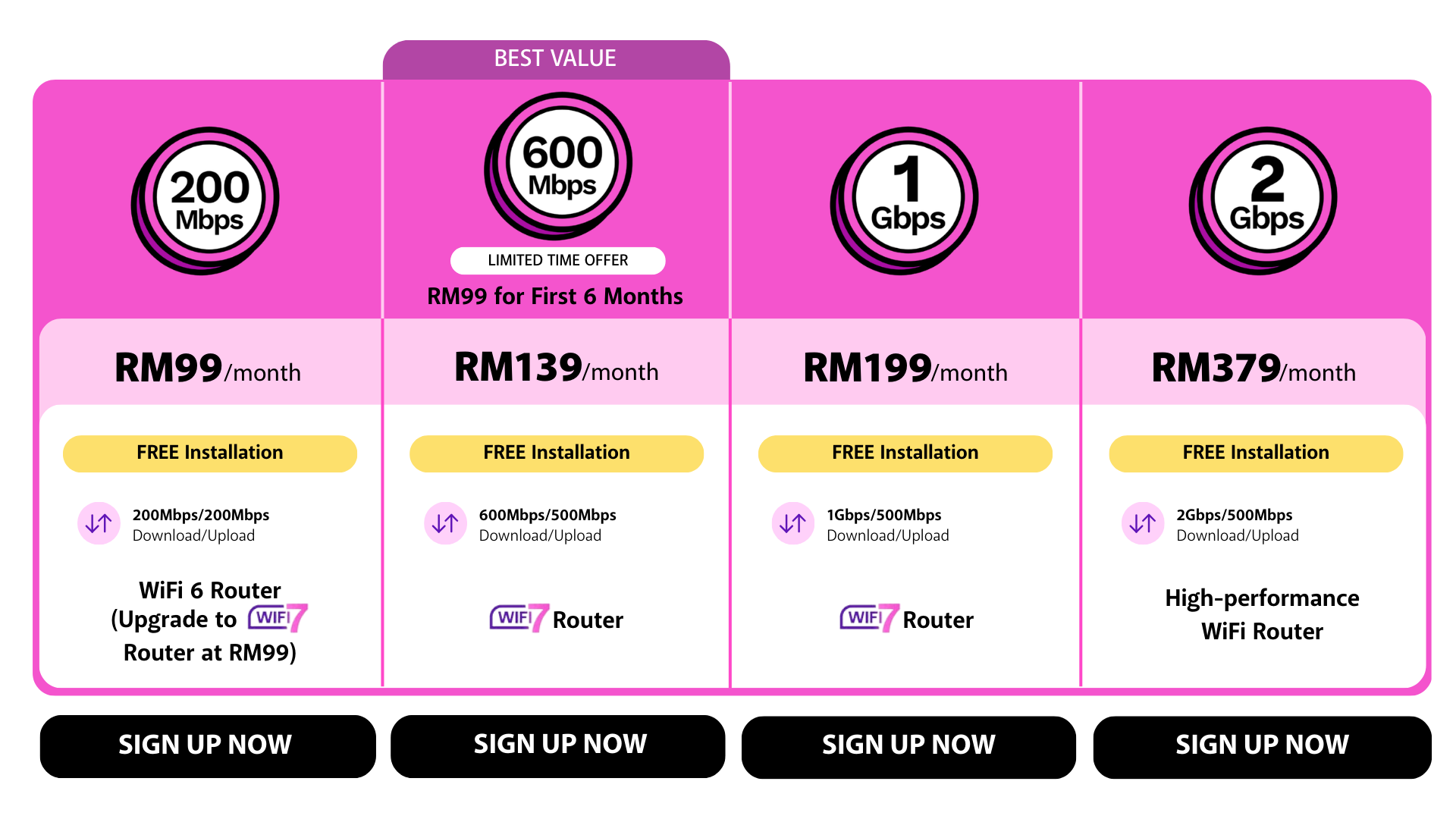
First in Malaysia to offer TRUE 2Gbps - the fastest home Internet plan you can find.

Extended
Installation Hours
No need to rush. We’ve extended our weekday hours up to 8pm and weekend hours up to 4pm.

24/7
Support
Chat with us
write to us
help is just a tap away!
FAQ
General
How do I switch to Time from another service provider? >
What if I don’t get the desired speed? >
Your broadband connection is influenced by many factors, including device compatibility and whether you’re using a WiFi or wired connection.
Here are a few things you can do to speed up your connection:
1. Try switching your router off and on again. This will clear your device's cached data.
2. Check out Time Hacks for tips on making the most of your Internet.
3. Log into Self Care or the Time Internet app to check on your connection and troubleshoot potential issues. You can also chat with us easily.
Can I downgrade my plan? >
Yes, you can. For 24-month plans, you can downgrade your plan from month 7 onward.
But do note that your contract will be reset for 24 months.
For 12-month plans, you’ll have to complete your contract tenure first before you can downgrade.
Just reach out to us on Live Chat if you’re looking to update your plan.
If you terminate your subscription within your contract tenure, you will: >
- Forfeit any discount you’ve been enjoying; and
- Incur an early termination charge of RM500 or the sum of your remaining contractual period, whichever is higher.
- Need to return the devices included in your plan in good condition and failure to do so may result in penalty charges.
You may refer to your Self Care homepage for your contract term. The termination charges (if any) will be charged to your final bill after
cancellation. There is no penalty for cancelling your service once you are out of contract.
WiFi 7
What is WiFi 7? >
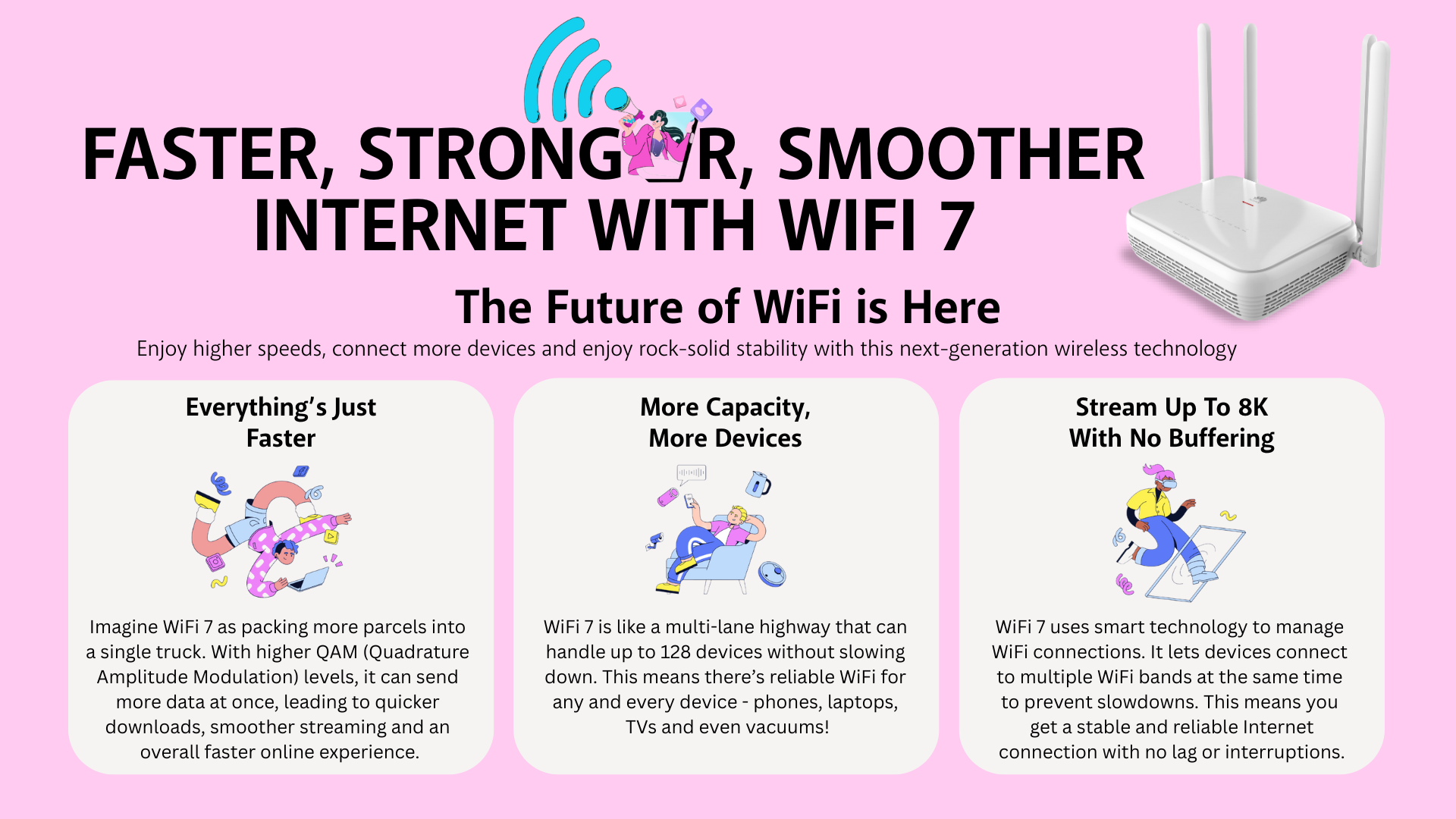
WiFi 7 is the next generation of wireless technology, offering a significant leap in speed, capacity and stability compared to WiFi 6 - like a
supercharged WiFi experience! However, to truly unlock these benefits, your personal devices need to be WiFi 7-enabled.
Does WiFi 7 work with all my devices? >
Yes! WiFi 7 routers are backwards compatible. This means even if your devices aren't WiFi 7 yet, they'll still connect to the network. But to experience
the full potential of WiFi 7 (think blazing-fast speeds and rock-solid connections), upgrading your devices is recommended.
I don't have any WiFi 7 devices yet. Should I still upgrade my router? >
Absolutely! Upgrading to a WiFi 7 router future-proofs your network and ensures smooth connectivity when you eventually get WiFi 7 devices.
Plus, you'll still experience some benefits like improved network stability with your current devices.
How do I know if my device is WiFi 7-enabled? >
There are a few ways to check if your device supports WiFi 7:
Device specifications: Look for the WiFi standard listed in your device's manual or manufacturer's website. It should mention "WiFi 7" or "802.11be" if
it's compatible.
Contact the manufacturer: Actual availability can vary, but reaching out to your device manufacturer's support team is a reliable way to confirm its
WiFi compatibility.
Is WiFi 7 setup complicated? >
No worries! Setting up a WiFi 7 router is just like your current setup. Our installation experts will handle everything for you.
Remember, while all devices can connect, WiFi 7 shines brightest with compatible devices.
12-Month Contract
How do the 12-month and 24-month plans differ? >
It all boils down to flexibility! Here's a quick breakdown:
24-Month Plan: Ideal for those who plan to stay put for a longer period. Offers the most value and exclusive promos.
12-Month Plan: Offers a good balance between commitment and flexibility at a slightly higher monthly fee. Perfect if you have a 12-month lease or
know you'll be in the same place for at least a year
Can I enjoy any promos or discounts with the 12-month plans? >
Unfortunately, no. Promos do not apply to the 12-month plans, except for the Time Fibre Home Offer for the Differently-abled (OKU).
Can I convert my 12-month plan to a 24-month plan? >
We’re sorry, but that option is not available. The 12-month plans are catered to short-term subscribers.
Can I relocate my service on a 12-month plan? >
Yes, absolutely! As long as the new address is within our coverage area. Plus, relocation is free once you’ve finished your 12-month contract.
Can I upgrade/downgrade my 12-month plan? >
Yes, definitely. If you want to upgrade your plan, just log into Self Care and check it out.
You can only downgrade your plan after finishing up your 12-month contract by reaching out to us on Live Chat.
2Gbps
Where is 2Gbps available? >
2Gbps is currently only available in selected buildings in selected locations. But fret not, we are working on bringing it to more places soon.
Why is it only available in selected locations? >
Launching 2Gbps means that we have to upgrade our existing infrastructure to accommodate the new speed. We have identified Time-ready buildings
in various locations and are currently working on upgrading them in stages.
What router are you providing with the 2Gbps plan? >
We provide a high-performance WiFi router equipped with a 2.5Gbps LAN port with every 2Gbps subscription.
Do we really need 2Gbps? >
A high bandwidth plan like 2Gbps means it can support more devices and more concurrent activities like streaming and gaming. Whether your
household is large or if you’re multitasking on several platforms, you won’t have to compromise on Internet speed.
Installation
Will I be charged for installation? >
We provide basic cabling services of:
1. Up to 20 metres from point-of-entry i.e. main door to your equipment e.g. router; or
2. Up to 6 metres from the socket for buildings with pre-laid fibre to your equipment e.g. router.
Additional charges may apply for requests beyond basic cabling services. Please ask for the approved rate card to confirm any costs to be incurred (if
any), which are payable directly to the service installer.
What if I have plaster ceilings in my home? >
There are a few installation options:
1. Exposed cable (free)
2. Fibre run through white conduit casing (free)
3. Non-standard installation involving the opening and closing of access hole (subject to additional charges by the service installer).
Does installation require any drilling? >
Yes, some drilling may be necessary, but we will request your prior approval.
How long does it take to install and activate my service? >
Installation can take 2 to 4 hours depending on the type of unit you live in. The installation process involves a site survey, ducting, piping, electrical
work, equipment configuration and testing.
Extra configuration of non-Time equipment is subject to additional professional service charges imposed by the service installer.
Devices
How does mesh WiFi extend my WiFi coverage? >
When you place a mesh node in a WiFi dead zone, the node will capture and broadcast the wireless signal and speed of your router to hard-to-reach
corners of your home. By placing mesh nodes in strategic spots throughout your home, you can create a seamless, stable WiFi network that keeps
you connected no matter which room you’re in.
How do I install the devices? >
Our Time-authorised installers will do it for you.
Is installation free? >
For new subscribers who’ve received devices as part of their plan or bought add-ons during signup, any installation carried out by our installers is
free of charge. For devices purchased from the Self Care shop, an RM80 installation fee will be charged. This fee will be reflected in your next bill.
What will happen to my device(s) if I terminate my service? >
The devices included in your plan need to be returned to us. They are considered Time’s property, so do take good care of them. We’ll coordinate the
return process with you. Failure to return them in good condition will result in a penalty charge.
If you purchased any devices (routers or mesh WiFi), you can keep them and continue using them if compatible.
Is there a warranty period for the devices? >
| Equipment | Limited Warranty Period |
|---|---|
| All routers and mesh nodes supplied by Time | 2 years |
| ONU | Lifetime |